

AFFILIATE PROGRAM
Earn the 20% recurring with SendApp Official
Invite new users to sign up on SendApp Official and receive automatic commissions on every subscription. Forever.
AFFILIATE PROGRAM
Invite new users to sign up on SendApp Official and receive automatic commissions on every subscription. Forever.
HOW IT WORKS
Every person who signs up through your link becomes your referral. Each subscription generates an automatic commission of 20%. Forever.
In your Affiliate dashboard, you'll find your unique referral link. Copy it and share it.
Just click the link and complete the registration. It's automatically tracked.
For every subscription or renewal of the invited customer, you receive an automatic commission.
YOUR DASHBOARD
Four constantly updated indicators to monitor referrals, commissions, and payments.
Users registered via your link
Active and valid referrals
Total amount accrued
Credit ready for withdrawal
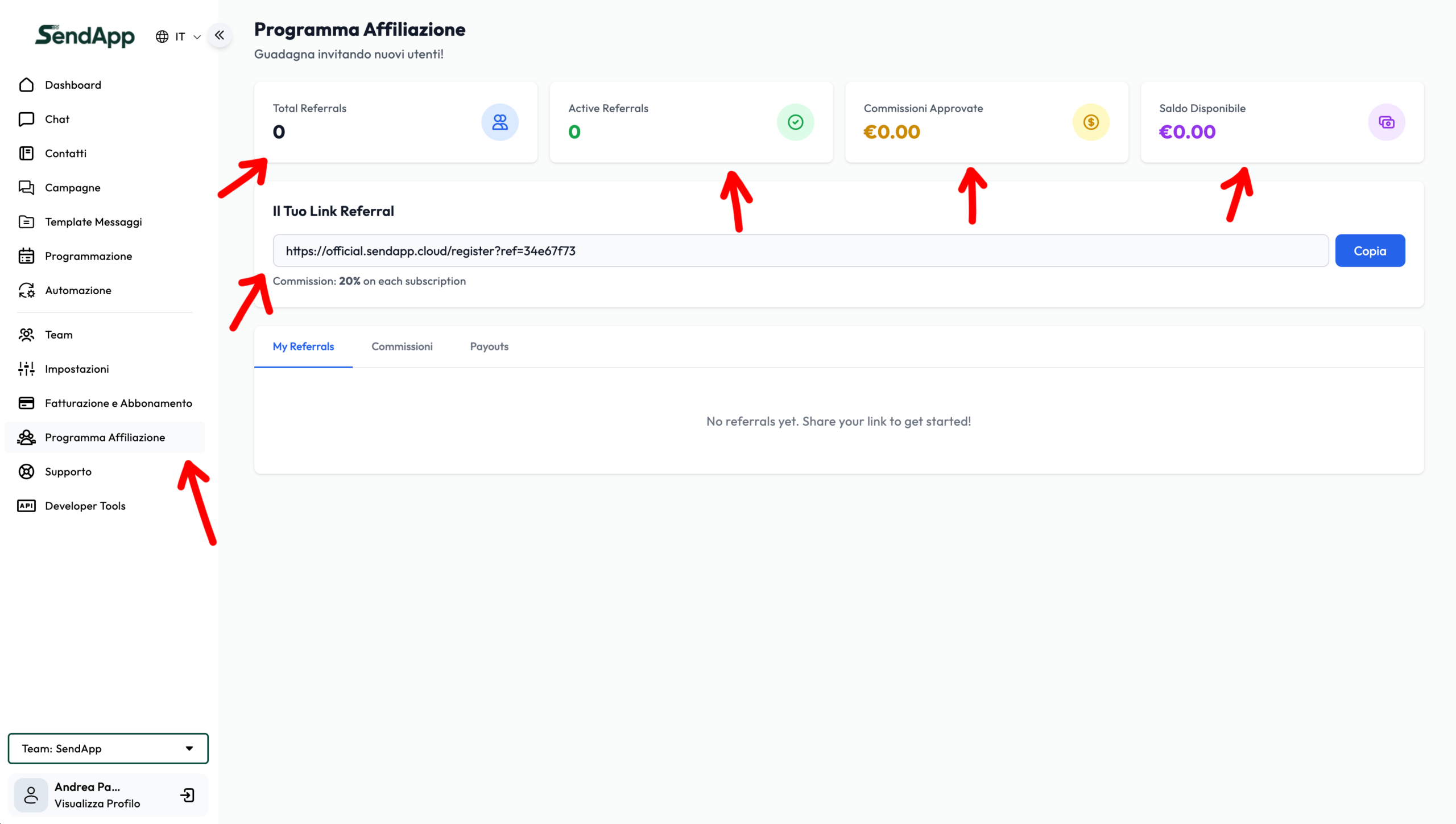
DETAILS
Below the dashboard you will find the section Your referral link with the unique personal link and the button Copy.
Share it with clients, partners, agencies, and professional contacts. Every registration via this link is automatically tracked.
Where to share it:
The tab My Referrals Show the list of users registered through your link.
As referrals begin to register, they appear here with their details. This section allows you to monitor the growth of your affiliate network.
The tab Commissions List all the commissions generated by your referrals.
Commissions pass from state to state pending to approved according to the system's rules. This section is essential for monitoring your accrued earnings.
The tab Payouts It is dedicated to commission payments. Here you can find the button Request Payment and the history of requests.
Minimum threshold: €200
Until your available balance reaches the minimum amount of €200, the request payment button remains disabled. Once you reach the threshold, you can request a payout.
1. Copy and share your referral link
2. A new user registers via the link
3. The referral is tracked in the dashboard
4. When you subscribe to a plan, a commission is generated
5. The commission is approved
6. Once you reach €200, request payment
SUGGESTIONS
Show how SendApp Official works and include your link in the video description.
Post content on Facebook, Instagram, TikTok, and LinkedIn with your referral link.
Use WhatsApp to explain the benefits of the official Meta API to your customers and partners.
Add the affiliate link to your site menu or a dedicated banner.
Send a dedicated email to your list explaining the benefits of SendApp Official.
Share case studies and real-world numbers on how SendApp Official has improved customers' businesses.
START NOW
Sign up, copy your affiliate link, and start earning recurring commissions on every customer you refer.