See who buys after every WhatsApp campaign
SendApp Pixel connects your website to the messages you send. For every campaign you see who tapped the button, who reached your site and who bought, with revenue from confirmed orders and the ROI worked out on the real cost of the messages.
- WhatsApp, SMS and email
- Confirmed orders only
- Respects the cookie banner
- Click
- Visit
- Purchase
- Revenue
Revenue to the last clicked message · 7 days
Revenue from confirmed orders
A bank transfer stays “to be confirmed” until the shop marks it as paid. Refunds are taken off.
ROI on the real cost
The cost of the messages comes from your credit movements, message by message.
Three channels together
WhatsApp, SMS and email campaigns in the same table, together with automations.
Clicks counted on the button
The click goes through SendApp and is counted once per recipient.
Native plugins
A plugin for WordPress and WooCommerce, a module for PrestaShop, one line of code elsewhere.
Privacy first
No events before the banner choice, never the full IP, no browser fingerprints.
The campaign goes out. Then you know nothing.
WhatsApp tells you who the message was delivered to. What matters happens afterwards, on your website, and without a connection it stays invisible.
Without SendApp Pixel
- Delivered3
- Clicks?
- Visits?
- Purchases?
- Revenue?
The message arrives, then the customer disappears from your radar.
 With SendApp Pixel
- Delivered3
- Clicks2
- Visits2
- Purchases1
- Revenue€24.90
Every step has a number, message by message.
How it works, in three steps
Set up in a few minutes, no developers needed.
- 1
Connect the site
In SendApp open Pixel and press “Connect a site”. Type the address: SendApp reads the home page and recognises the platform, the cookie banner and the code already there by itself.
SendApp recognises by itself- Website platform
- Cookie banner
- Code already there
- 2
Choose what to measure
Page views, WhatsApp clicks, products, cart, checkout and purchases are measured out of the box. Your own actions, such as a form sent or a button, you point at with one click on the site.
- 3
Publish
Install the plugin for WordPress or WooCommerce, the module for PrestaShop, or paste one line of code. The connection is checked by itself.
- WordPress
- WooCommerce
- PrestaShop
- </head>
From click to revenue, with the ROI
Every WhatsApp, SMS or email campaign has its clicks, visits, purchases and revenue. In the detail you see who clicked, who bought and who is worth writing to again.
- Clickon the message button
- Visitto the right page of the site
- Purchaseorder confirmed by the shop
- Revenueattributed to the campaign
ROIconfirmed revenue ÷ cost of the messages
Example from the demo account: €24.90 on €0.08 of messages = 316.8×
It works for campaigns and automations on WhatsApp, SMS and email.
Where the numbers come from
- Revenue confirmed by orders
From the plugin, the orders webhook, the API or WhatsApp Commerce. The only revenue that goes into the ROI.
- To be confirmed
Orders seen only by the browser or waiting for payment, such as a bank transfer not yet marked as paid.
- Helped other sales
People who clicked, but whose last click before buying was on another message.
- Influenced, outside the ROI
People who received the message and bought within 3 days without clicking.
- Cost of the messages
From your credit movements, message by message.
Automations started by what happens on your site
An automation can start from what the customer really does on your website. The ready-made example: a checkout left halfway comes back on WhatsApp.
It can start when the customer
- views a page
- takes an action
- sends a form
- leaves the checkout
- buys
- comes back to the site
- shows high interest
- 1Checkout left on the site
The customer reaches payment and stops.
- 2After a while
SendApp waits for the time you choose.
- 3WhatsApp message
With the button to go back to the cart.
- 4Stops if they buy
Whoever has already paid gets nothing.
Hi Giulia, your cart is waiting: the Gold Blend is still there.
Back to the cartOrder confirmed: automation stopped
The button that counts clicks
When you create a WhatsApp template with a link button, switch on “Count the clicks”. You know who tapped it, even if they have not chosen in the site’s cookie banner yet.
- The click goes through SendApp and is counted once per recipient.
- The customer lands straight away on the page you choose in the campaign.
- Counting the click does not depend on the site’s cookies.
New templateend_of_summer_sale
Hi {{1}}! The end-of-summer sale has started: 30% off every blend until Sunday.
Link button
See the saleThe customer profile knows what they do on your site
Visits, how much they spent, last order, last campaign clicked and consent: all in the contact profile. The activity shows the whole journey, including the link opened.
- Spent
- €24.90
- Last order
- #98 · confirmed
- Last campaign clicked
- Checkout left
- Marketing consent
- Active
Activity
- Opened the message link
- Visited the site
- Completed order #98
In segments
- Last visit
- Visits in the last 30 days
- Interest level
Ask Sendy, the AI assistant inside SendApp
- Who is ready to buy?
- How much did the campaigns bring in?
In-store sales and phone orders can also come from your server, through the API: they count as revenue like website orders. API
Works with your website
A plugin for WordPress and WooCommerce, a module for PrestaShop, or one line of code before </head> on any other site.
 WordPressPlugin
 WooCommercePlugin
 PrestaShopModule
 ShopifyOne line of code
 WixOne line of code
 WebflowOne line of code
 SquarespaceOne line of code
 FramerOne line of code
 Google Tag ManagerOne line of code
Measure without breaking your customers’ trust
The Pixel always waits for the visitor’s choice in your site’s cookie banner.
Nothing before the choice
Until the visitor chooses in the banner, the Pixel writes nothing in the browser and sends no events.
Whoever declines is not counted
If the visitor declines cookies, the Pixel does not measure them.
Never the full IP address
The Pixel never stores the full IP address.
No browser fingerprint
The Pixel does not build browser fingerprints to recognise visitors.
Reads the most common banners by itself
- CookieYes
- Cookiebot
- Complianz
- OneTrust
- Iubenda
- WP Consent API
- Google Consent Mode
See it in action
From the button of a WhatsApp campaign to the website, all the way to the confirmed order. Narration in Italian, subtitles in 6 languages.
The video loads from YouTube (youtube-nocookie.com) only when you press play.
What it looks like inside SendApp
Real screens of the platform, on computer and phone.
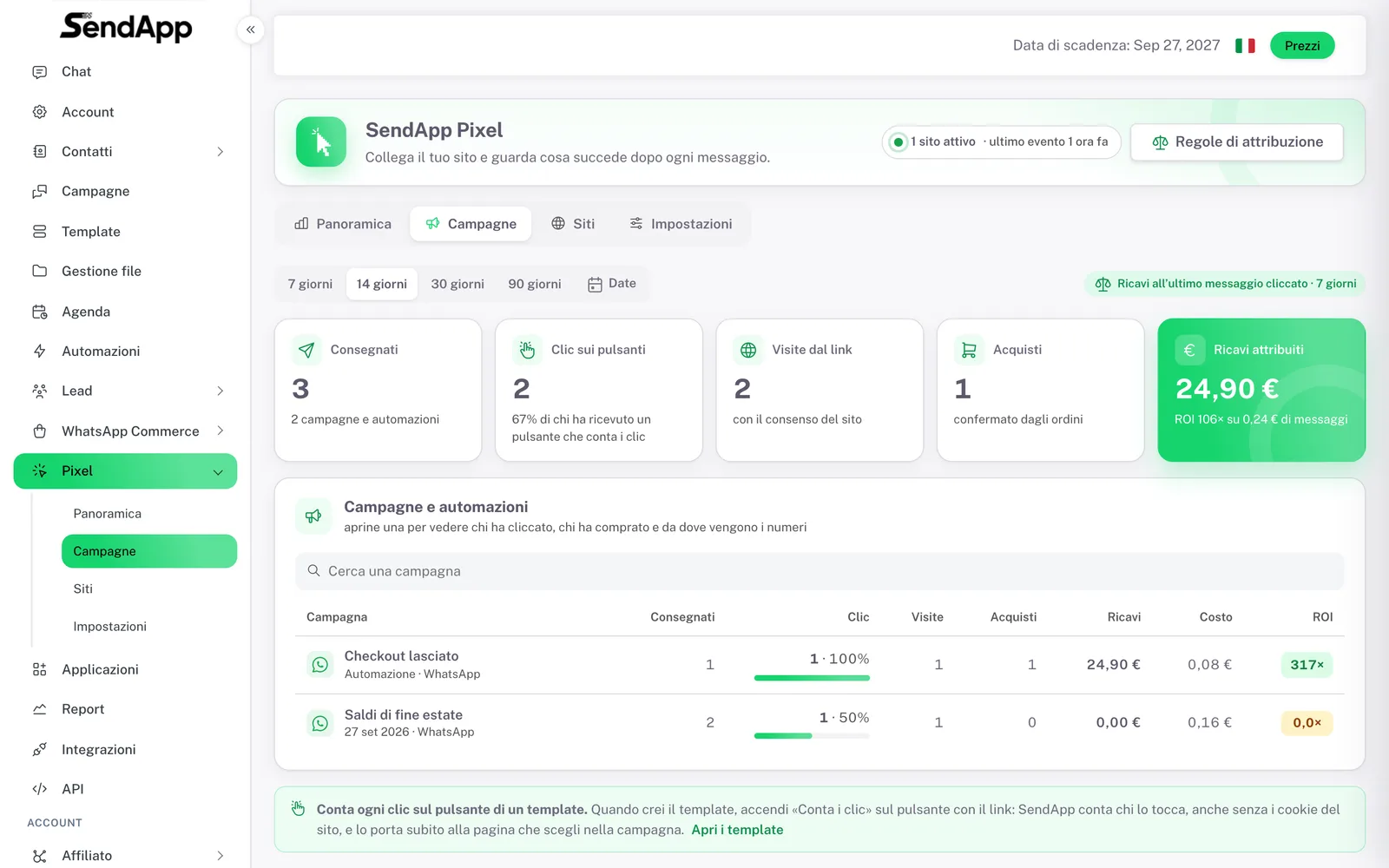
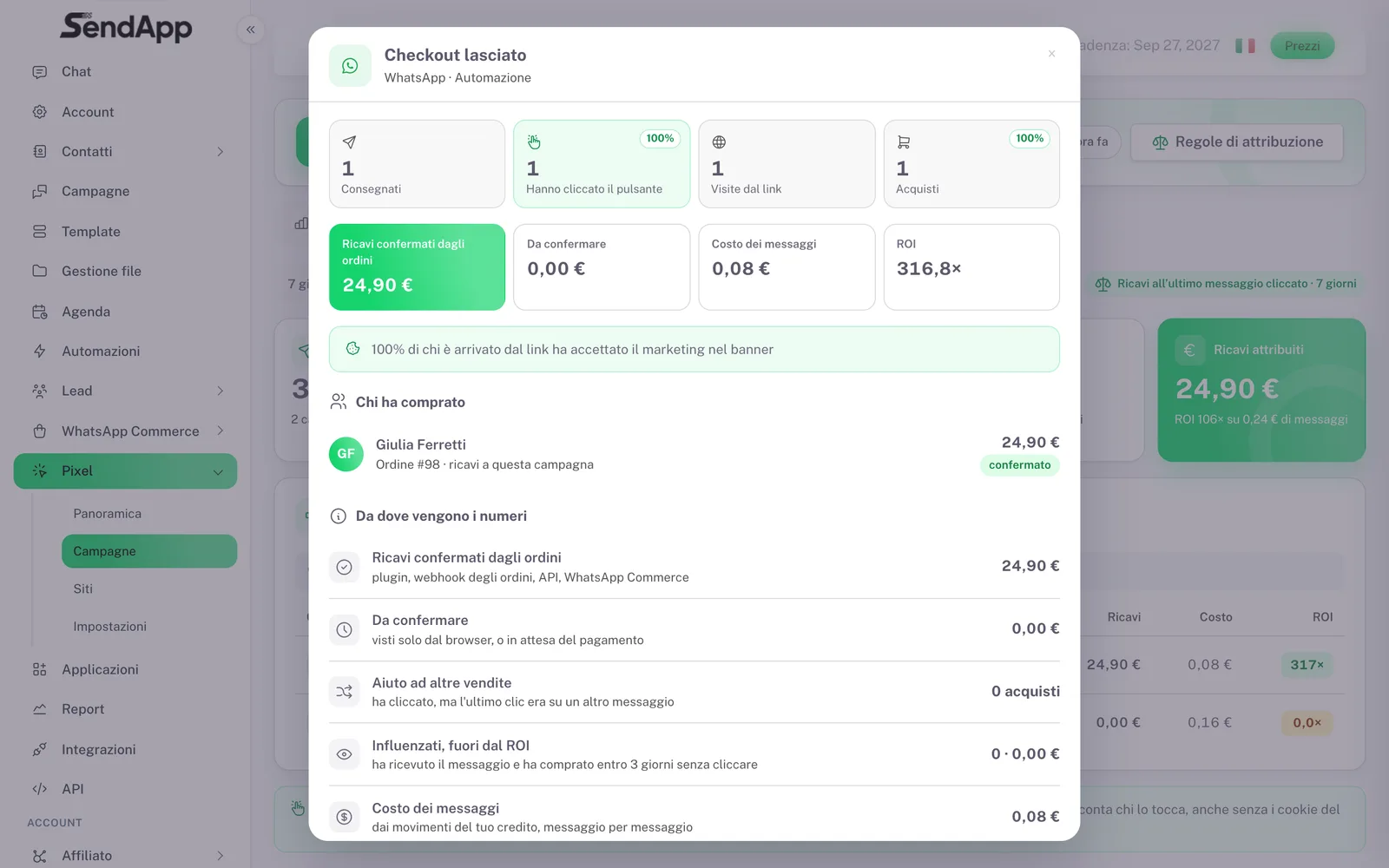
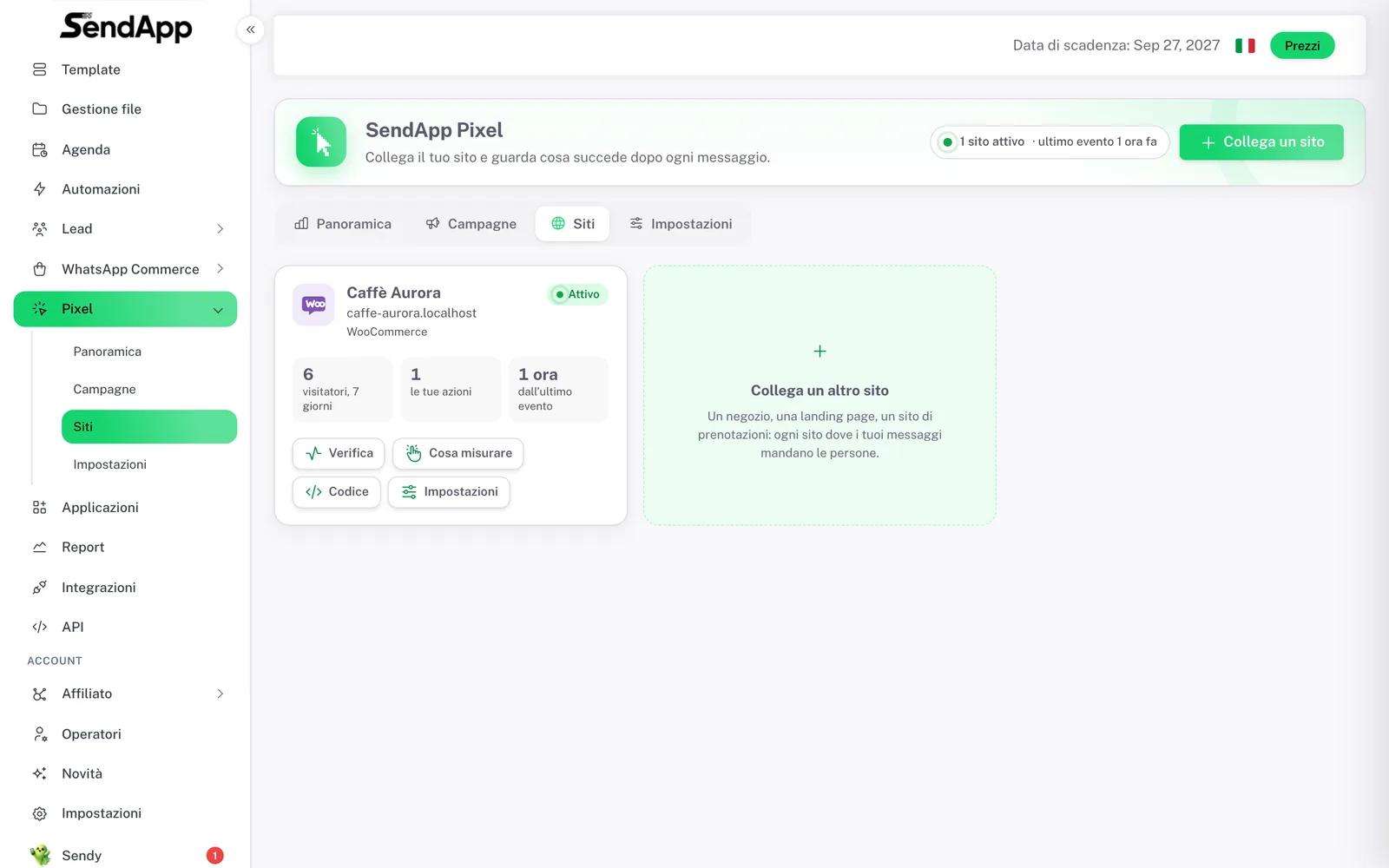
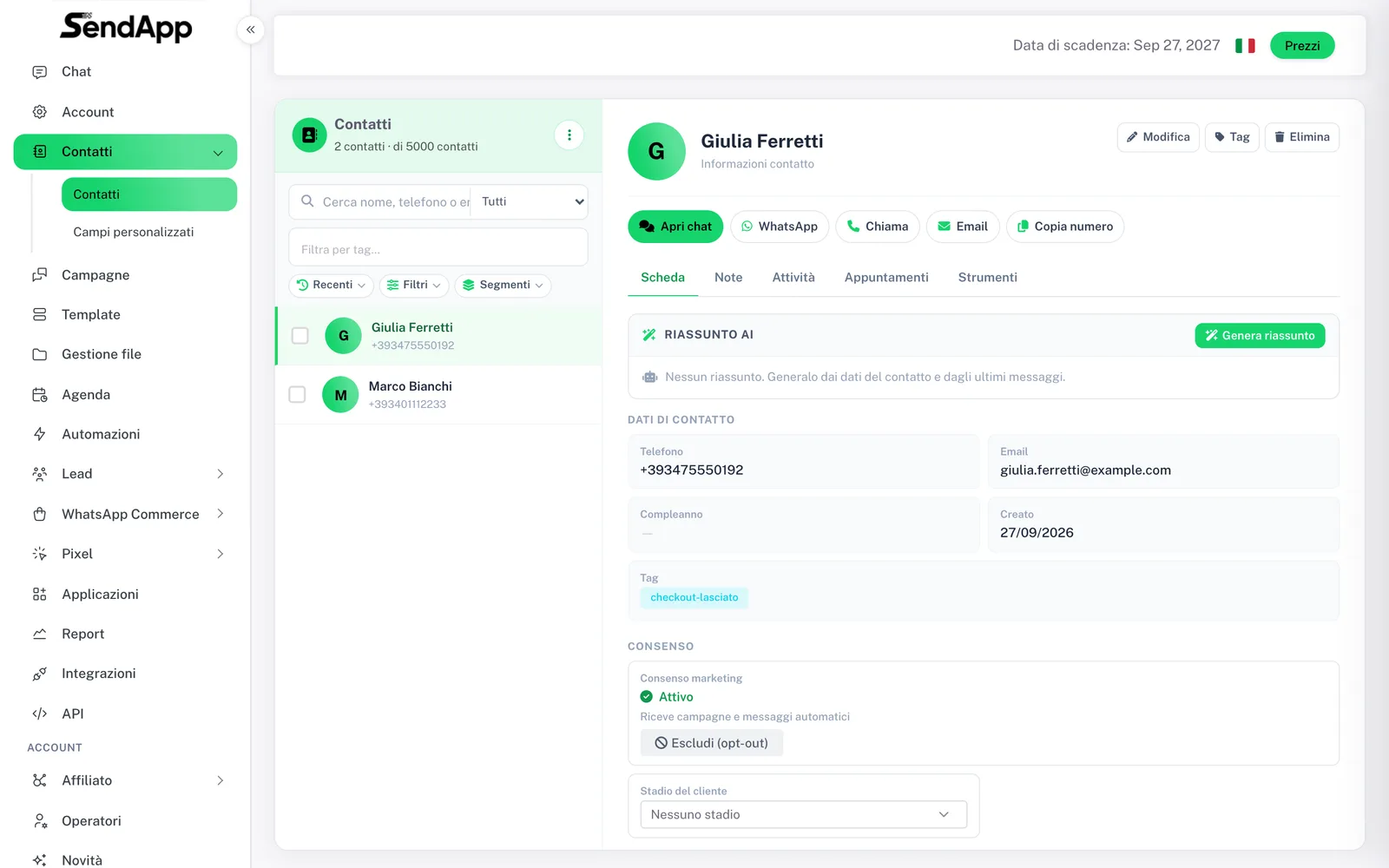
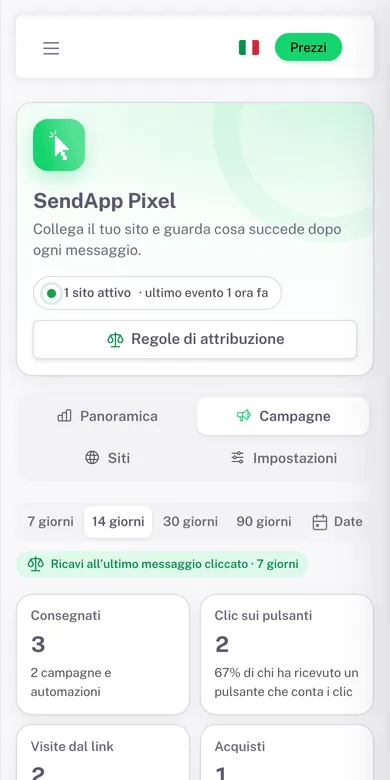
Real screens from a demo account with made-up data (interface in Italian). app.sendapp.ai/docs
Questions about SendApp Pixel
From today you know what every message brings in
Connect your site, switch on “Count the clicks” on your next template and watch revenue arrive campaign by campaign.